Deploying and Running an ASP.NET Core application on Ubuntu
I have deployed many applications on cloud infrastructure at clients. I have had my own little setup at linode with a small kubernetes cluster. It was nice and back when I was using it, it had a fixed price - even though it was sort of expensive, at least for what I was using it for1.
When I return today, I see that pricing has changed - you probably guessed it: it's a "Cloud Computing Calculator" - it's the same everywhere (linode/Akamai, AWS, Azure, Google) and it's not really for me.
Maybe it's not that expensive and maybe you think "you get a lot for the money" — but I'm not convinced that it's the right solution for my projects and I have heard about people with an "elastic" platform that bankrupted them overnight and stuff like that scares me, because we all make mistakes right? So a $5 VM at Hetzner is something I can understand, pricewise. The kicker is that a VM is a computer I can do whatever I want to - that kind of freedom may cost a little more on the effort side, but on the other hand it is freedom (from silly vendor lockins that do exist even though everything should be the same and interchangeable).
Enough ranting, more hygge
And by hygge I mean system setup and deployment pipelines. Specifically for bankbog.dk since that's what I am working with these days.
The idea is something like: (boring, not new, seen a thousand times)
- The application is running on the server, exposing port 5000 or whatever with Kestrel.
- We have nginx in front of bankbog.dk receiving https requests and relaying them internally to our application.
- We have
systemdon Ubuntu to keep our application alive.
Prepare the way
Create a user:
sudo adduser # call it bankbog-deploy-user
Create a directory:
sudo mkdir /var/www/dev.api.bankbog.dk # we are deploying to the dev env.
Let the new user own the directory and the files:
# Change owner - nginx worker process runs as www-data.
sudo chown bankbog-deploy-user:www-data /var/www/dev.api.bankbog.dk

# Let files in the folder inherit folder permissions.
$ sudo chmod g+s /var/www/dev.api.bankbog.dk

# Remove read, write, execute for "others".
$ sudo chmod o-rwx /var/www/dev.api.bankbog.dk
Use the way
Aka, get the application copied to the server.
This can be done with something like scp, which is available in GitHub
actions, via appleboy/scp-action
and can be used in our deployment pipeline that up until now just builds and
tests the code. In other words, we have the continuous integration part, and now
we are adding the continuous deployment.
name: Build and Test

on:
  push:
    branches: [ "main" ]
  pull_request:
    branches: [ "main" ]

jobs:
  build-and-test:

    runs-on: ubuntu-latest

    steps:
    - uses: actions/checkout@v3

    - name: setup dotnet 8.0.x
      uses: actions/setup-dotnet@v2
      with:
        dotnet-version: 8.0.x

    - name: restore
      run: dotnet restore

    - name: build
      run: dotnet build --no-restore

    - name: appsettings variable substitution
      uses: microsoft/variable-substitution@v1
      with:
        files: '**/appsettings.test.continuous_integration.json'
      env:
        MySqlDbConfig.Server: ${{ secrets.INTEGRATION_TEST_DB_HOST }}
        MySqlDbConfig.Port: ${{ secrets.INTEGRATION_TEST_DB_PORT }}
        MySqlDbConfig.User: ${{ secrets.INTEGRATION_TEST_DB_USER }}
        MySqlDbConfig.Pass: ${{ secrets.INTEGRATION_TEST_DB_PASS }}

    - name: test
      run: ASPNETCORE_ENVIRONMENT=continuous_integration dotnet test --no-build
Now we want to not only build and test, but also deploy to our dev environment.
There's a few things to know at this point:
- In order to have something to deploy, we use the
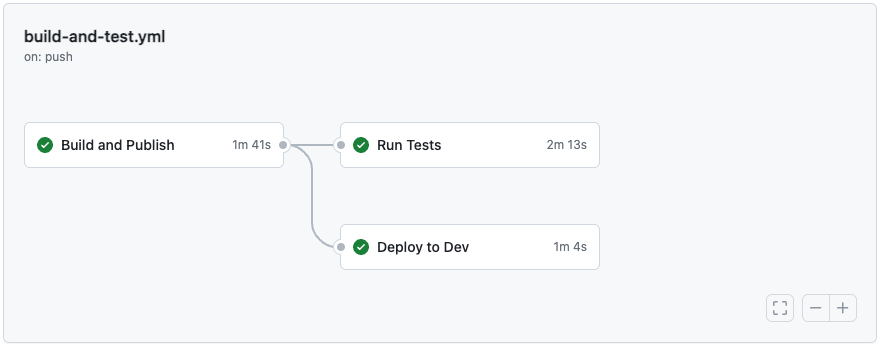
dotnet publishcommand. That will output the required binaries to a folder and it is that folder that we want to copy to the dev environment. - Since we can already now imagine that we want to use this pipeline to also push to other environments like staging and production, it's probably a good idea to split the action file into multiple "jobs". With jobs, we can define one for each environment and use the GitHub environment feature to easily have secrets and variables that can be substituted in per environment.
- While we develop the pipeline file, it could be nice to not wait for tests, so let's also move that to a job of its own. We can make the "deploy to dev" job dependent on the test job's success — or not. If not, we would deploy code to dev where we also know tests are failing, but maybe that's not the worst thing in the whole world - then we can investigate the regression on a running system in dev. Maybe that's not a sensible trade-off in every situation so of course it depends on the situation.
With this in mind, let's see what that could look like:
name: Build, Test and Deploy

on:
  push:
    branches: [ "main" ]
  pull_request:
    branches: [ "main" ]

jobs:
  # This job will checkout, setup dotnet, build and then publish.
  # The output directory is then uploaded as an artifact that can
  # be used in other jobs.
  build-publish:
    name: Build and Publish
    runs-on: ubuntu-latest
    steps:
    - uses: actions/checkout@v4

    - name: setup dotnet 8.0.x
      uses: actions/setup-dotnet@v4
      with:
        dotnet-version: 8.0.x

    - name: restore
      run: dotnet restore

    - name: build
      run: dotnet build --no-restore

    - name: publish
      run: dotnet publish dma.bankbog --runtime linux-x64 --output published-build

    - name: upload artifact
      uses: actions/upload-artifact@v4
      with:
        name: published-build
        path: published-build

  # This job will run tests. Same is in the before pipeline, only difference
  # being that it is now in a job of its own. This job will run once we have
  # built and published.
  test:
    name: Run Tests
    runs-on: ubuntu-latest
    needs: [build-publish]
    steps:
    - uses: actions/checkout@v4

    - name: setup dotnet 8.0.x
      uses: actions/setup-dotnet@v4
      with:
        dotnet-version: 8.0.x

    - name: appsettings variable substitution for integration test
      uses: devops-actions/variable-substitution@master
      with:
        files: '**/appsettings.test.continuous_integration.json'
      env:
        MySqlDbConfig.Server: ${{ secrets.INTEGRATION_TEST_DB_HOST }}
        MySqlDbConfig.Port: ${{ secrets.INTEGRATION_TEST_DB_PORT }}
        MySqlDbConfig.User: ${{ secrets.INTEGRATION_TEST_DB_USER }}
        MySqlDbConfig.Pass: ${{ secrets.INTEGRATION_TEST_DB_PASS }}

    - name: test
      run: ASPNETCORE_ENVIRONMENT=continuous_integration dotnet test

  # This job downloads the artifact from build-publish and does the necessary
  # variable substitutions in the appsettings file. Then copies to the dev
  # environment with scp.
  deploy-dev:
    name: Deploy to Dev
    needs: [build-publish]
    environment: dev
    runs-on: ubuntu-latest
    steps:
    - name: Download artifact
      uses: actions/download-artifact@v4
      with:
        name: published-build
        path: published-build

    - name: appsettings variable substitution for dev
      uses: devops-actions/variable-substitution@master
      with:
        files: '**/appsettings.dev.json'
      env:
        MySqlDbConfig.Server: ${{ vars.DB_HOST }}
        MySqlDbConfig.Port: ${{ vars.DB_PORT }}
        MySqlDbConfig.User: ${{ vars.DB_USER }}
        MySqlDbConfig.Pass: ${{ secrets.DB_PASS }}
        MySqlDbConfig.DatabaseName: ${{ vars.DB_NAME }}
        JwtSettings.Secret: ${{ secrets.JWT_SIGNING_KEY }}

    - name: copy to ${{ vars.DEPLOY_HOST }}:${{ vars.DEPLOY_PATH }}
      uses: appleboy/scp-action@v0.1.7
      with:
        host: ${{ vars.DEPLOY_HOST }}
        username: ${{ vars.DEPLOY_USER }}
        password: ${{ secrets.DEPLOY_PASS }}
        source: published-build/*
        target: ${{ vars.DEPLOY_PATH }}
        overwrite: true
Get the application running
We need the appropriate dotnet runtime. Put this into a script.
# Download Microsoft signing key and repository. Adjust version per your setup.
wget https://packages.microsoft.com/config/ubuntu/22.04/packages-microsoft-prod.deb -O packages-microsoft-prod.deb

# Install Microsoft signing key and repository
sudo dpkg -i packages-microsoft-prod.deb

# Clean up
rm packages-microsoft-prod.deb

# Update packages
sudo apt update

# Install asp.net core runtime
sudo apt install -y aspnetcore-runtime-8.0
We are not planning on building the application on the server, we want to do that in a CI/CD so no need to install the full SDK.
Make sure that we have a database user configured
Maybe this is not needed for all applications, but included here just to give a feeling for what is required for an asp.net core application with a MySQL database, where the migrations are run with DbUp.
For something like this, we have to have a database user configured for the running aplication. Refer back to another post to see how to make this happen. But for this one maybe we don't want to have as broad permissions. I did like this:
-- Create a database for the application.
CREATE DATABASE application_database;

-- Create a localhost user (can't connect from other machines).
CREATE USER 'application_user'@'localhost' IDENTIFIED BY 'CrazYPASSw0rd!!!';

-- Let the user to whatever it needs to the database.
GRANT ALL ON application_database.* TO 'application_user'@'localhost';

-- Let the perform select statements on the "mysql" schema,
-- which is required by the MySQL extension for DbUp.
GRANT select ON mysql.* TO 'application_user'@'localhost';
Use systemd to start automatically
Mostly copy/paste from an ms learning site.
# Copy this file to /etc/systemd/system/whatever-the-service-is-called.service
[Unit]
Description=Bankbog API for on the dev environment

[Service]
WorkingDirectory=/var/www/dev.api.bankbog.dk
ExecStart=/usr/bin/dotnet /var/www/dev.api.bankbog.dk/published-build/dma.bankbog.dll
Restart=always
RestartSec=5
KillSignal=SIGINT
SyslogIdentifier=dev-api-bankbog
User=www-data
Environment=ASPNETCORE_ENVIRONMENT=dev

[Install]
WantedBy=multi-user.target
Expose with nginx
Put something like this in /etc/nginx/sites-available:2
server {
    listen        80;
    server_name   dev.api.bankbog.dk;
    location / {
        proxy_pass         http://127.0.0.1:5000/;
        proxy_http_version 1.1;
        proxy_set_header   Upgrade $http_upgrade;
        proxy_set_header   Connection $connection_upgrade;
        proxy_set_header   Host $host;
        proxy_cache_bypass $http_upgrade;
        proxy_set_header   X-Forwarded-For $proxy_add_x_forwarded_for;
        proxy_set_header   X-Forwarded-Proto $scheme;
    }
}
Then make a symlink in /etc/nginx/sites-enabled:
symlink -s /etc/nginx/sites-available/dev.api.bankbog.dk /etc/nginx/sites-enabled/dev.api.bankbog.dk
Now we have an application running internally on port 5000, exposed to the web through nginx on hygge.bankbog.dk (assuming that is a real domain with a DNS record pointing to the server).
Add SSL
Of course nobody wants to use http for anything anymore. So we want to add an SSL certificate. Use certbot for that, and then:
certbot --nginx
This will start up a little wizard where you can choose which site(s) to add SSL
to. Couldn't be easier and will auto-renew. After running this, our
configuration in sites-available looks a little different - certbot has
changed the file so that it listens for https connections and will redirect to
https for requests that use http.
Restart the application on deploy
Now we have a running application that is being deployed continuously by our
pipeline that is automatically triggered when we push something to main or make
a pull request towards main. But we are missing that final piece: restarting the
systemd service that hosts the application.
We should make a little script for that. It will just be one line (maybe two if you'd like a little feedback):
#!/bin/sh
# README: Copy this file to deploy directory
sudo servicectl restart dev-api-bankbog-dk.service
echo "Hygge"
Make the executable: chmod +x /var/www/dev-api-bankbog-dk/deploy.sh. Try and
run with /var/www/dev-api-bankbog-dk/deploy.sh. It's asking for a sudo
password, right? That's no good since we want to be able to call this script
from our pipeline and cannot interact with the prompt when doing that.
We can fix this situation by allowing our deploy user to run certain sudo commands without being prompted for a password.
Add a new file to /etc/sudoers.d/ on the server:
# README: With this file in /etc/sudoers.d,
# bankbog-deploy-user will be able to start/stop/restart it's service.

bankbog-deploy-user ALL=(ALL) NOPASSWD: /bin/systemctl start   dev-api-bankbog-dk.service
bankbog-deploy-user ALL=(ALL) NOPASSWD: /bin/systemctl stop    dev-api-bankbog-dk.service
bankbog-deploy-user ALL=(ALL) NOPASSWD: /bin/systemctl restart dev-api-bankbog-dk.service
Try and run the deploy.sh file again - now it will no longer require a
password to be input. Then to verify that the service was restarted, run sudo servicectl status dev-api-bankbog-dk.service.
We are ready to run the depoy file from the CI/CD pipeline. Add the following as the last step in the deploy-dev job:
    - name: run deploy.sh
      uses: appleboy/ssh-action@v1.0.3
      with:
        host: ${{ vars.DEPLOY_HOST }}
        username: ${{ vars.DEPLOY_USER }}
        password: ${{ secrets.DEPLOY_PASS }}
        script: ${{ vars.DEPLOY_PATH }}/deploy.sh
Final result
name: Build, Test and Deploy

on:
  push:
    branches: [ "main" ]
  pull_request:
    branches: [ "main" ]

jobs:
  build-test-publish:
    name: Build and Publish
    runs-on: ubuntu-latest
    steps:
    - uses: actions/checkout@v4

    - name: setup dotnet 8.0.x
      uses: actions/setup-dotnet@v4
      with:
        dotnet-version: 8.0.x

    - name: restore
      run: dotnet restore

    - name: build
      run: dotnet build --no-restore

    - name: publish
      run: dotnet publish dma.bankbog --runtime linux-x64 --output published-build

    - name: upload artifact
      uses: actions/upload-artifact@v4
      with:
        name: published-build
        path: published-build

  test:
    name: Run Tests
    runs-on: ubuntu-latest
    needs: [build-test-publish]
    steps:
    - uses: actions/checkout@v4

    - name: setup dotnet 8.0.x
      uses: actions/setup-dotnet@v4
      with:
        dotnet-version: 8.0.x

    - name: appsettings variable substitution for integration test
      uses: devops-actions/variable-substitution@master
      with:
        files: '**/appsettings.test.continuous_integration.json'
      env:
        MySqlDbConfig.Server: ${{ secrets.INTEGRATION_TEST_DB_HOST }}
        MySqlDbConfig.Port: ${{ secrets.INTEGRATION_TEST_DB_PORT }}
        MySqlDbConfig.User: ${{ secrets.INTEGRATION_TEST_DB_USER }}
        MySqlDbConfig.Pass: ${{ secrets.INTEGRATION_TEST_DB_PASS }}

    - name: test
      run: ASPNETCORE_ENVIRONMENT=continuous_integration dotnet test

  deploy-dev:
    name: Deploy to Dev
    needs: [build-test-publish]
    environment: dev
    runs-on: ubuntu-latest
    steps:
    - name: Download artifact
      uses: actions/download-artifact@v4
      with:
        name: published-build
        path: published-build

    - name: appsettings variable substitution for dev
      uses: devops-actions/variable-substitution@master
      with:
        files: '**/appsettings.dev.json'
      env:
        MySqlDbConfig.Server: ${{ vars.DB_HOST }}
        MySqlDbConfig.Port: ${{ vars.DB_PORT }}
        MySqlDbConfig.User: ${{ vars.DB_USER }}
        MySqlDbConfig.Pass: ${{ secrets.DB_PASS }}
        MySqlDbConfig.DatabaseName: ${{ vars.DB_NAME }}
        JwtSettings.Secret: ${{ secrets.JWT_SIGNING_KEY }}

    - name: copy to ${{ vars.DEPLOY_HOST }}:${{ vars.DEPLOY_PATH }}
      uses: appleboy/scp-action@v0.1.7
      with:
        host: ${{ vars.DEPLOY_HOST }}
        username: ${{ vars.DEPLOY_USER }}
        password: ${{ secrets.DEPLOY_PASS }}
        source: published-build/*
        target: ${{ vars.DEPLOY_PATH }}
        overwrite: true

    - name: run deploy.sh
      uses: appleboy/ssh-action@v1.0.3
      with:
        host: ${{ vars.DEPLOY_HOST }}
        username: ${{ vars.DEPLOY_USER }}
        password: ${{ secrets.DEPLOY_PASS }}
        script: ${{ vars.DEPLOY_PATH }}/deploy.sh
Footnotes
- Hosting jwt.show, datamadsen.dk, and guid.store. ↩
- Don't copy/paste from the ms learning site. ↩