Controller Groups with Swagger and ASP.NET Core
While creating a web api with a vertical slice/feature approach it may very well be that that we end up with a controller per feature (create, change name, etc.)
Resulting in something like this as project structure:
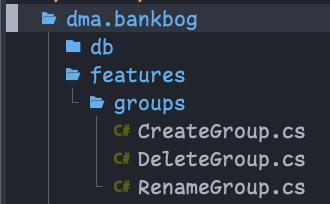
Where in each file, a controller is defined as the interface to handle the command or query for that feature. This results in something like this with swagger ui:

This is fine, but can become unwieldy with time, which is where grouping by a "Group name" can help.
On a controller, add the
ApiExplorerSettings and specify the
GroupName property. For instance give it the name "Groups". So an adorned
controller might look like:
[Authorize]
[Route("bankbog/commands/group/create")]
[Consumes("application/json")]
[Produces("application/json")]
[ApiExplorerSettings(GroupName = "Group")]
public class CreateGroupController(ICommandHandler<CreateGroupCommand, Group> cmdHandler) : ControllerBase
{
    [HttpPost]
    public async Task<Group> CreateGroup([FromBody] CreateGroupCommand command)
    {
        return await cmdHandler.Handle(command);
    }
}
If you run an application now, the controllers might be gone altogether from swagger ui:

This is becuase of an inclusion predicate that can be configured with swagger. By default, at the time of writing, the predicate is implemented like this:
private bool DefaultDocInclusionPredicate(string documentName, ApiDescription apiDescription)
{
    return apiDescription.GroupName == null || apiDescription.GroupName == documentName;
}
So if nothing special has been done, the documentName parameter here is "v1"
which is not equal to the apiDescription.GroupName (which is "Group"). There's
a few different ways around this situation. One that fits well with my current
project in its current state is to just include everything:
services.AddSwaggerGen(options =>
{
    // ... something about security schemes maybe ...

    // Include all controllers in the generated documentation.
    options.DocInclusionPredicate((documentName, apiDescription) => true);
});
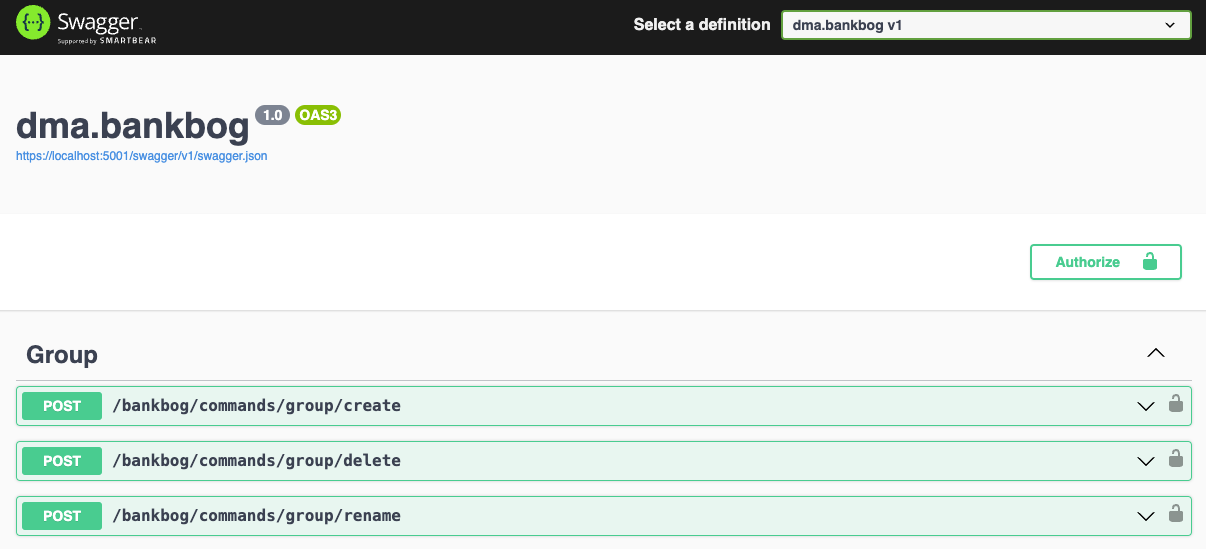
At this point, we're back to where the controllers are included in swagger's UI, but still ungrouped. Swagger groups by something they call tags, so we need to set that up in the configuration as well:
services.AddSwaggerGen(options =>
{
    // ... something about security schemes maybe ...

    // Include all controllers in the generated documentation.
    options.DocInclusionPredicate((documentName, apiDescription) => true);

    // Tag/group actions by their GroupName property if it is set, otherwise by
    // the controller name like normal.
    options.TagActionsBy(api =>
    {
        if (api.GroupName != null)
            return new[] { api.GroupName };

        if (api.ActionDescriptor is ControllerActionDescriptor controllerActionDescriptor)
            return new[] { controllerActionDescriptor.ControllerName };

        throw new InvalidOperationException("Unable to determine tag for endpoint.");
    });
});
Result
We now ended up with something that looks like this in swagger: